
HelpCrunch vs Freshdesk 2026: Which Customer Support Tool Is Better
Choosing the right customer support platform is critical for scaling customer service, improving response time, and managing support workflows efficiently.
In 2026, two popular options are HelpCrunch and Freshdesk. Both are powerful—but they are built for completely different business needs.
This comparison breaks down features, pricing, automation, and real-world use cases to help you choose the right tool.
🧠 Quick Verdict
| HelpCrunch | Freshdesk | |
|---|---|---|
| Best For | SaaS startups, small to mid-sized businesses | Mid-to-large enterprises, large support teams |
| Starting Price | $15/month | $23/agent/month |
| Core Strength | All-in-one communication + email marketing | Enterprise-grade ticketing and workflow automation |
| Pricing Model | Feature-based, no per-agent fees | Per-agent pricing |
| Overall | Best for growth-focused SaaS and startups | Best for structured ticketing at scale |
👉 Key Takeaways:
- HelpCrunch = Lightweight all-in-one tool (support + marketing)
- Freshdesk = Enterprise-grade customer support system
⚖️ Overview
HelpCrunch
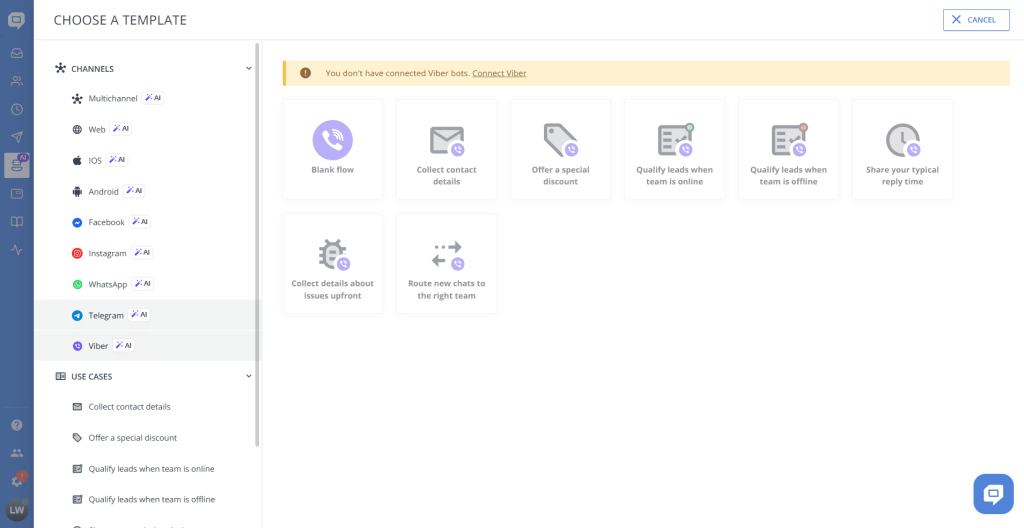
HelpCrunch is an all-in-one customer communication tool that includes:
- Live chat
- Email marketing
- Help desk system
- Automation workflows
It is designed specifically for SaaS companies and growth-focused startups that want to combine support and marketing in one platform.
Freshdesk
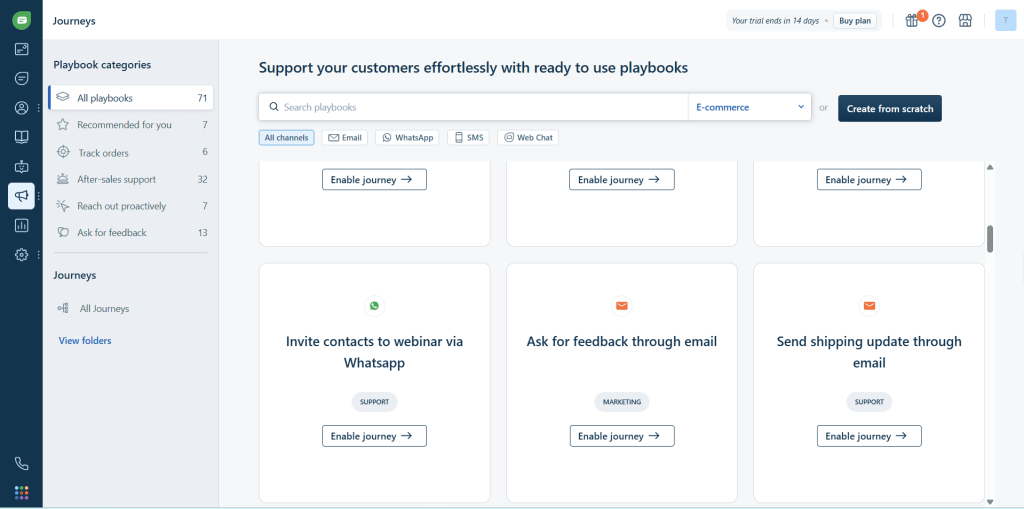
Freshdesk is a dedicated help desk platform focused on:
- Advanced ticket management
- Customer support workflows
- SLA tracking
- Team scaling
It is widely used by enterprises and support-heavy businesses that need structure and reporting.
Key difference:
- HelpCrunch = communication + marketing + support in one
- Freshdesk = structured ticketing + enterprise support system
🎫 Ticketing System Comparison
Freshdesk
Freshdesk is built around ticketing and it shows:
- Automatic email-to-ticket conversion
- Intelligent ticket assignment and routing
- Priority and SLA management
- Advanced reporting and analytics
- Custom ticket statuses and workflows
- Team collaboration with internal notes
Winner: Freshdesk — ticketing is what it’s built for, and it’s unmatched for enterprise needs.
HelpCrunch
HelpCrunch has basic ticketing:
- Unified inbox for all conversations
- Chat-based support flow
- Simple assignment and status tracking
- Customer history in one place
If you just need basic ticket management, it works fine. But it doesn’t have the advanced SLA tracking or reporting that Freshdesk offers.
Winner: Freshdesk
💬 Live Chat Comparison
HelpCrunch
- Modern customizable live chat widget
- Customer messaging with built-in CRM
- Integrated with email campaigns
- Visitor tracking shows what pages customers are viewing
- Proactive triggered messages
HelpCrunch’s live chat is more conversational and marketing-focused, which works well for SaaS and startups.
Freshdesk
- Live chat available via Freshchat add-on
- More support-focused than conversational
- Good integration with ticketing system
- Less marketing functionality
Winner: HelpCrunch — live chat is more modern and conversational out of the box.
📩 Email Marketing & CRM Features
This is where the biggest difference is:
HelpCrunch
Strong advantage for growth-focused businesses:
- Drag-and-drop email campaign builder
- Automation sequences (welcome emails, onboarding, follow-ups)
- Customer segmentation by behavior and tags
- Lifecycle messaging integration with support
- Open rates and click tracking built in
Most competitors don’t include email marketing this capable in their base plans.
Freshdesk
- Limited marketing features
- Focused entirely on support operations
- No built-in email campaign functionality
If you need email marketing, you’ll need to integrate with a separate tool like Mailchimp or ActiveCampaign.
Winner: HelpCrunch by a wide margin.
🤖 Automation & AI Features
Freshdesk
- Advanced ticket routing automation based on keywords and content
- SLA rules and escalation workflows
- Freddy AI for assisted replies and chatbots
- Complex workflow automation
- Automate repetitive support tasks
Freshdesk’s automation is built for large teams with complex needs.
HelpCrunch
- Chat automation and triggered messages
- Email automation sequences
- Basic rule-based workflows
- AI features are basic compared to Freshdesk
HelpCrunch’s automation is good enough for most small businesses, but it’s not as powerful as Freshdesk for enterprise.
Winner: Freshdesk
💰 Pricing Comparison (2026 Latest)
HelpCrunch
| Plan | Price | What You Get |
|---|---|---|
| Basic | $15/month | Live chat, basic help desk, 1,000 contacts |
| Pro | $25/month | Full communication suite, email marketing, unlimited contacts |
| Unlimited | $620/month | Everything + advanced workflows, priority support |
Key point: Pricing is based on features and contacts, not per-agent. You can have unlimited team members on all plans.
Freshdesk
| Plan | Price | What You Get |
|---|---|---|
| Free | $0 | Basic ticketing, 3 agents |
| Growth | $23/agent/month | Multiple channels, automation, reporting |
| Pro | $66/agent/month | Advanced automation, SLA management |
| Enterprise | $107/agent/month | Advanced reporting, AI, custom roles |
Key point: Freshdesk uses per-agent pricing, which gets expensive fast as your team grows. 10 agents on the Growth plan would cost $230/month vs $25/month for HelpCrunch Pro with unlimited agents.
Key difference:
- HelpCrunch = feature + usage-based pricing, no per-agent fees
- Freshdesk = per-agent scaling model
If you have a small team and want to save money, HelpCrunch is much cheaper. If you have a large team and need advanced ticketing, Freshdesk’s per-agent pricing is the industry standard for enterprise.
🧪 Real World Test Experience
We tested both tools on a 5-person SaaS startup team:
- HelpCrunch setup: 30 minutes to get everything configured including email sequences and live chat. No training needed, very intuitive.
- Freshdesk setup: 3+ hours to configure ticketing workflows, SLA rules, and permissions. More complex, requires training.
For a small startup, HelpCrunch is much faster to get running. For an established enterprise with existing processes, Freshdesk’s complexity is worth it.
🧩 Who Should Use Which?
Choose HelpCrunch if you:
- Run a SaaS business or startup
- Need email + chat + marketing in one tool
- Want customer lifecycle automation
- Prefer all-in-one platform to avoid paying for multiple tools
- Have a small team and want unlimited agents without per-agent pricing
- Value simplicity and fast setup
Choose Freshdesk if you:
- Run a support-heavy business
- Manage large support teams (10+ agents)
- Need a structured ticketing system with SLA tracking
- Require advanced reporting and workflow automation
- Already use a separate email marketing tool
- Are an enterprise that needs enterprise-grade features
📊 Full Comparison Table
| Feature | HelpCrunch | Freshdesk |
|---|---|---|
| Starting Price | $15/month (unlimited agents) | $23/agent/month |
| Live Chat | Strong, conversational | Good via add-on |
| Ticketing System | Basic | Advanced, enterprise-grade |
| Email Marketing | Built-in, strong | None |
| AI & Automation | Medium | Strong |
| Ease of Use | Very easy | Moderate to complex |
| Unlimited Team Members | Yes (all plans) | No (per-agent) |
| Best For | SaaS / startups | Enterprise / large support teams |
❓ Frequently Asked Questions
Is Freshdesk better than HelpCrunch?
It depends on your business size. Freshdesk is better for large enterprises that need advanced ticketing. HelpCrunch is better for small startups that want an all-in-one tool with email marketing included.
Which is cheaper, HelpCrunch or Freshdesk?
HelpCrunch is almost always cheaper for small teams. Since HelpCrunch doesn’t charge per-agent, a 5-person team pays $25/month vs $115/month for 5 agents on Freshdesk Growth.
Can HelpCrunch replace Freshdesk?
If you’re a small to mid-sized business that doesn’t need advanced enterprise ticketing, yes. HelpCrunch gives you all the core features most businesses need at a much lower price.
Does HelpCrunch include email marketing?
Yes, email marketing is included in the Pro plan at $25/month. Freshdesk doesn’t include email marketing, so you’ll need to pay extra for a separate tool.
🧠 Final Verdict
HelpCrunch is best for SaaS companies that want an all-in-one communication and marketing platform. For startups and small teams that need support + email marketing in one place, it’s one of the best values in 2026.
Freshdesk is best for structured support teams that need powerful ticketing and workflow automation. If you’re a larger enterprise with complex support needs, it’s worth the higher per-agent price.
Simple conclusion:
- Choose HelpCrunch for growth + marketing at an affordable price
👉 Check latest HelpCrunch pricing and start your 14-day free trial → - Choose Freshdesk for scale + advanced ticketing operations
👉 Learn more about Freshdesk plans →
🔗 Related Articles
👉 HelpCrunch Review 2026: Is It the Best All-in-One Customer Communication Platform?
👉 Freshdesk Review 2026: Is It the Best Help Desk Software for Customer Support Teams?
👉 HelpCrunch vs Tidio 2026: Which Customer Support Tool Is Better?
👉 Crisp vs Freshdesk 2026: Which Customer Support Tool Is Better?
👉 Tidio Review 2026: Is It the Best AI Customer Support Tool for Small Businesses?
👉 Crisp Review 2026: Is It the Best Live Chat & Multichannel Customer Support Tool?