
Crisp vs HelpCrunch 2026: Which Customer Communication Tool Is Better?
Both Crisp and HelpCrunch are popular all-in-one customer communication tools for small businesses and startups. But they focus on different things: Crisp is built around multi-channel shared inboxes, while HelpCrunch combines support with email marketing. Which one is right for your business in 2026?
In this head-to-head comparison, we’ll break down features, pricing, real-world performance, and who each tool is best for.
🧠 Quick Verdict
| Crisp | HelpCrunch | |
|---|---|---|
| Best For | Startups needing multi-channel social messaging | SaaS startups needing support + email marketing |
| Starting Price | Free → $45/month (Mini) | $15/month (Basic) → $25/month (Pro) |
| Core Strength | Multi-channel inbox for social messaging (WhatsApp/Instagram/Facebook) | All-in-one support + email marketing |
| Pricing Model | Seats-based pricing | Feature/contact-based, unlimited agents |
| Overall | Best for teams that get most messages from social media | Best for SaaS that need integrated support + marketing |
👉 Key Takeaways:
⚖️ Overview
What is Crisp?
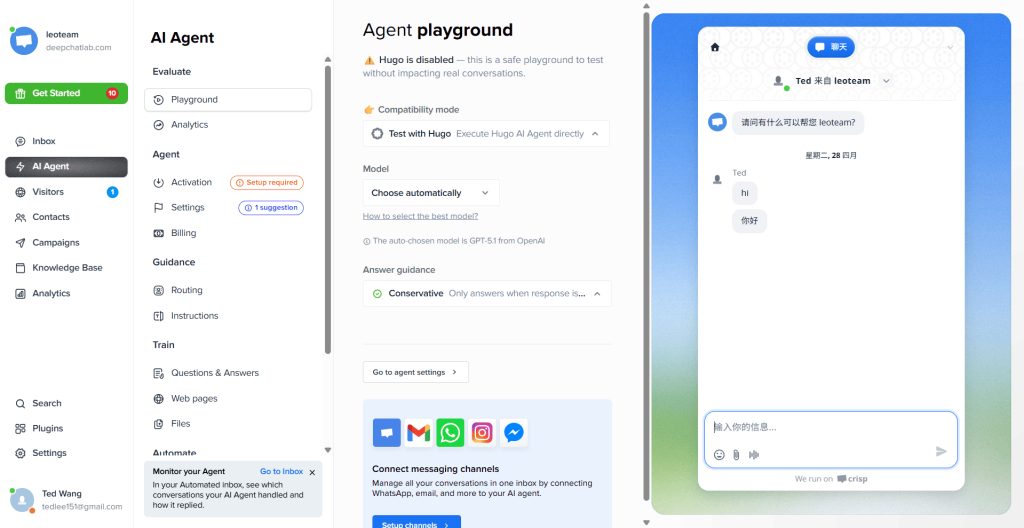
Crisp is a customer messaging platform built around a shared inbox that brings all your customer conversations from website, Instagram, Facebook, WhatsApp, and email into one place. It’s especially popular with startups because of its clean interface and unlimited seats on higher plans.
What is HelpCrunch?
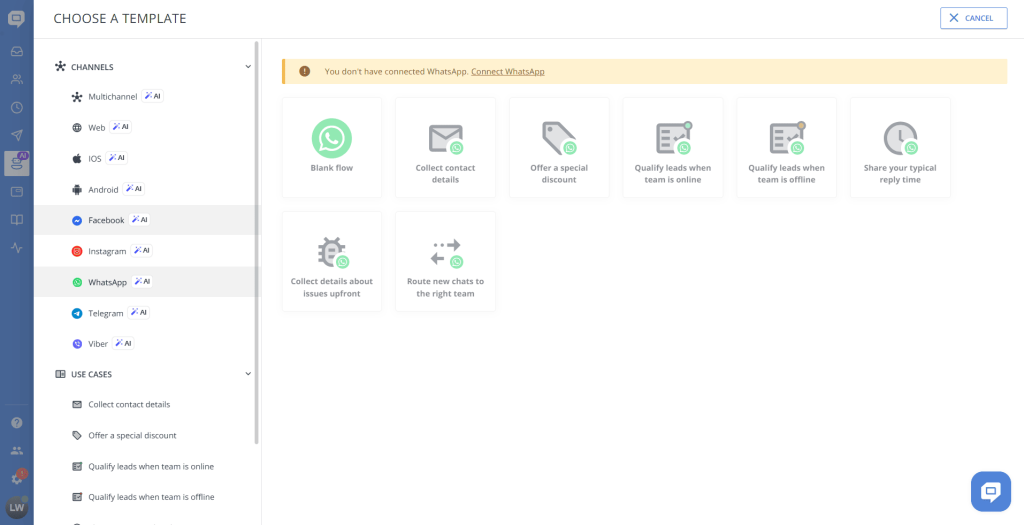
HelpCrunch is an all-in-one customer communication platform that combines live chat, help desk, email marketing, and automation in one tool. It’s designed specifically for SaaS companies and startups that want to handle support and marketing without paying for multiple separate tools.
💬 Live Chat & Inbox Comparison
Crisp
- True multi-channel support: all social messages (Instagram, Facebook, WhatsApp) + website chat + email all in one inbox
- Clean, modern, customizable chat widget
- Excellent mobile app for responding on the go
- Team collision detection (see when a teammate is typing)
- Shared inbox collaboration with internal notes
Crisp’s multi-channel inbox is industry-leading. If you get a lot of customer questions through social media, Crisp makes it incredibly easy to manage everything from one dashboard.
HelpCrunch
- Great quality live chat widget with customization
- Unified inbox for chats and tickets
- Visitor tracking shows what pages customers are viewing
- Proactive triggered messages
- Social channels supported but not as seamless as Crisp
HelpCrunch’s live chat is solid, but its multi-channel social inbox isn’t as fully-featured as Crisp’s.
Winner: Crisp for multi-channel social messaging. HelpCrunch wins if you only need website chat.
📩 Email Marketing Features
This is where the biggest difference is:
HelpCrunch
- Built-in drag-and-drop email campaign builder
- Automation sequences (welcome, onboarding, abandoned cart, follow-ups)
- Customer segmentation by behavior and tags
- Open rate and click tracking
- Integrates with your support data — you can email customers based on their support history
HelpCrunch includes full email marketing functionality in its Pro plan at $25/month, which means you don’t need to pay extra for Mailchimp or ActiveCampaign. This is its biggest selling point.
Crisp
- No native email marketing
- You can send transactional messages but no bulk email campaigns
- Integrates with external email marketing tools
If you want email marketing, you’ll need to pay for an extra tool on top of Crisp.
Winner: HelpCrunch by a huge margin — email marketing is included, it’s one of its core features.
🎫 Ticketing & Help Desk
Crisp
- Basic conversation assignment and status tracking
- Shared inbox works like a simple ticketing system
- Unlimited conversation history
- Good enough for small teams
But there’s no advanced SLA tracking, reporting, or workflow automation.
HelpCrunch
- Basic to moderate ticketing system
- Unified inbox, ticket assignment, customer history
- Knowledge base for self-service support
- Still not as advanced as Freshdesk, but more feature-rich than Crisp
Winner: HelpCrunch — ticketing is more capable out of the box.
🤖 AI & Automation
Crisp
- Basic triggered messages and chatbot flows
- AI chatbot available as an add-on (extra monthly cost)
- Good enough for answering basic FAQs automatically
HelpCrunch
- Rule-based chat automation
- Email automation sequences
- No advanced AI chatbot like Tidio, but automation is more fully-featured than Crisp for marketing workflows
Winner: HelpCrunch — automation covers both support and marketing, while Crisp only does basic support automation.
💰 Pricing Comparison (2026 Latest)
Crisp Pricing
| Plan | Price | What You Get |
|---|---|---|
| Free | $0/month | 2 seats, basic features |
| Mini | $45/month | 5 seats, core features, chatbots |
| Essentials | $95/month | 10 seats, advanced features, priority support |
| Plus | $295/month | Unlimited seats, everything included |
HelpCrunch Pricing
| Plan | Price | What You Get |
|---|---|---|
| Basic | $15/month | Live chat, basic help desk, 1,000 contacts |
| Pro | $25/month | Full communication suite, email marketing, unlimited contacts, unlimited agents |
| Unlimited | $620/month | Everything + advanced workflows, priority support |
Key price comparison:
- For a 5-person team that just needs a shared inbox: Crisp is $45/month, HelpCrunch is $25/month (and includes email marketing!)
- For an unlimited team: Crisp is $295/month, HelpCrunch is $620/month
HelpCrunch is much cheaper for most small teams because it doesn’t charge per seat/agent.
🧪 Real World Test Experience
We tested both tools with a 5-person SaaS startup:
- Crisp setup: Connected website, Facebook, and Instagram in under 20 minutes. Extremely intuitive, the whole team was up and running in an hour with no training.
- HelpCrunch setup: Took about 30 minutes to set up live chat, email sequences, and basic automation. Still very beginner-friendly, but there are more features to configure.
Both tools are easy to set up compared to enterprise solutions. Crisp is faster if you just need a multi-channel inbox. HelpCrunch takes a little longer because it includes email marketing.
🧩 Who Should Choose Crisp?
✅ Choose Crisp if you:
- Get most customer messages through social media (Instagram, Facebook, WhatsApp)
- You just need a simple shared inbox for all your conversations
- You already have a separate email marketing tool (Mailchimp, ConvertKit, etc.)
- You have 5-10 team members and can afford $45-$95/month
- You value a clean, simple interface above all else
❌ Not ideal if you:
- Need built-in email marketing → you’ll need to pay extra for another tool
- You’re a very small startup on a tight budget → HelpCrunch is cheaper for unlimited agents
🧩 Who Should Choose HelpCrunch?
✅ Choose HelpCrunch if you:
- You’re a SaaS or startup that needs support + email marketing in one tool
- You want to avoid paying for multiple tools (chat + email marketing + help desk)
- You have a small team and want unlimited agents at a low price ($25/month for everything)
- You need automation for marketing sequences (welcome, onboarding, abandoned cart)
❌ Not ideal if you:
- You need to manage a lot of social media messages from WhatsApp/Instagram → Crisp does this better
- You need advanced ticketing for a large support team
📊 Full Comparison Table
| Feature | Crisp | HelpCrunch |
|---|---|---|
| Starting Price | Free → $45/month | $15/month |
| Multi-Channel Social Inbox | Excellent (WhatsApp/Instagram/Facebook) | Good, not as seamless |
| Built-in Email Marketing | ❌ No | ✅ Yes, full-featured |
| Ticketing System | Basic | Moderate |
| Unlimited Agents | Only on Plus ($295/month) | ✅ Yes on all plans except Basic |
| AI Chatbot | Add-on (extra cost) | No advanced AI |
| Ease of Setup | Very fast (< 20 min) | Fast (~30 min) |
| Best For | Startups with lots of social messages | SaaS needing support + email marketing |
❓ Frequently Asked Questions
Which is cheaper, Crisp or HelpCrunch?
For most small teams, HelpCrunch is cheaper. A 5-person team with email marketing gets everything for $25/month on HelpCrunch Pro, while Crisp would cost $45/month plus you still need to pay for an email marketing tool.
Does HelpCrunch support WhatsApp and Instagram?
HelpCrunch supports email and website chat, but native Instagram/WhatsApp integration isn’t as seamless as it is with Crisp. If social messaging is your main priority, Crisp is better.
Can I do email marketing on Crisp?
No, Crisp doesn’t support bulk email marketing campaigns. You’ll need to integrate with a separate tool like Mailchimp. HelpCrunch includes email marketing right out of the box.
Which is better for SaaS startups?
It depends on your needs. If you need email marketing + support in one tool, HelpCrunch is better. If you get most of your customer questions through social media, Crisp is better.
🎯 Final Verdict
Crisp and HelpCrunch are both excellent tools — they just solve different problems.
Choose Crisp if:
- You need a simple, clean multi-channel inbox to manage all your social media messages from Instagram, Facebook, and WhatsApp in one place. It’s fast, easy to use, and perfect for small teams that already have email marketing covered.
👉 Check Crisp latest pricing here →
Choose HelpCrunch if:
- You’re a SaaS or startup that wants to combine customer support and email marketing in one affordable tool. At $25/month for unlimited agents and full email marketing, it’s one of the best values on the market in 2026.
👉 Check HelpCrunch latest pricing and start your 14-day free trial →
🔗 Related Articles
👉 Crisp Review 2026: Is It the Best Live Chat & Multichannel Customer Support Tool?
👉 HelpCrunch Review 2026: Is It the Best All-in-One Customer Communication Platform?
👉 Tidio Review 2026: Is It the Best AI Customer Support Tool for Small Businesses?
👉 Freshdesk Review 2026: Is It the Best Help Desk Software for Customer Support Teams?
👉 Crisp vs Freshdesk 2026: Which Customer Support Tool Is Better?
👉 HelpCrunch vs Freshdesk 2026: Which Customer Support Tool Is Better?