HelpCrunch Review 2026: Is It the Best All-in-One Customer Communication Platform?
Customer communication tools are evolving fast. Businesses now need more than live Chat—they need Automation, email marketing, and customer support in one place.
That’s where all-in-one platforms come in.
HelpCrunch is designed to combine live Chat, email marketing, help desk, and Automation into a single tool. But is it the right choice for your business in 2026?
In this review, we break down HelpCrunch’s features, pricing, pros and cons, and real use cases to help you decide.
🧠 Quick Verdict
- Best for: SaaS companies, startups, small to mid-sized businesses
- Core strength: All-in-one communication + email marketing in one platform
- Pricing: $15/month (Basic) → $25/month (Pro) → $620/month (Unlimited) (2026 latest)
- Limitation: AI features not as advanced as dedicated tools like Intercom or Tidio
Overall: HelpCrunch is a strong choice for businesses that want a unified customer communication platform without using multiple tools. If you need live chat + email marketing + help desk in one place at budget pricing, it’s one of the best options in 2026.
Check HelpCrunch’s latest pricing and start your 14-day free trial:
👉 View Latest Pricing →
🔗 Related Guides
- AI Customer Support Tools for Small Ecommerce Stores (Complete Guide 2026)
- Best AI Customer Support Tools for Small Businesses (2026 Guide)
🏆 What Is HelpCrunch?
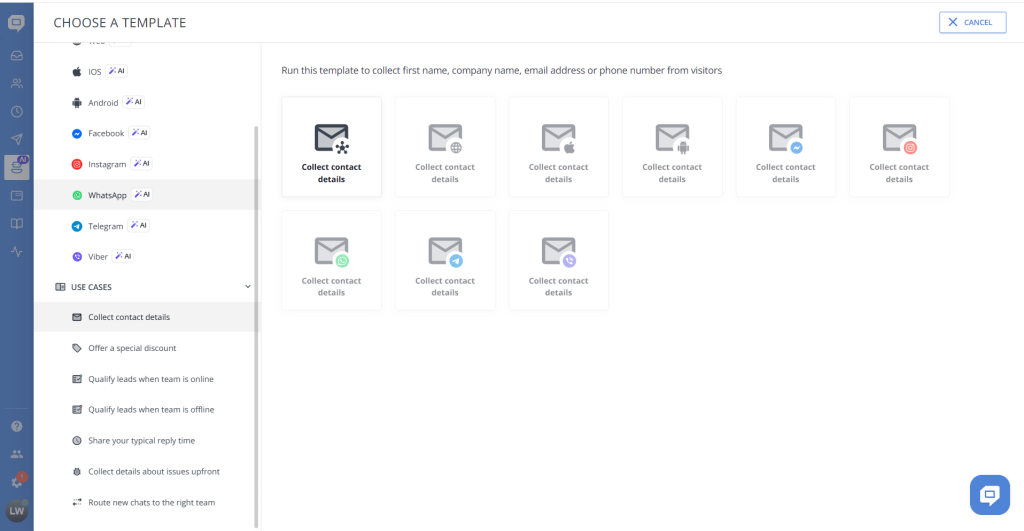
HelpCrunch is an all-in-one customer communication platform that includes:
- Live chat system with customizable widget
- Email marketing tools with automation sequences
- Help desk and ticketing system
- Knowledge base for self-service support
- Automation workflows for customer messaging
Its main goal is to help businesses manage customer relationships, support, and marketing in one place—so you don’t need to pay for 3-4 different tools.
💰 Pricing (2026 Latest, Updated)
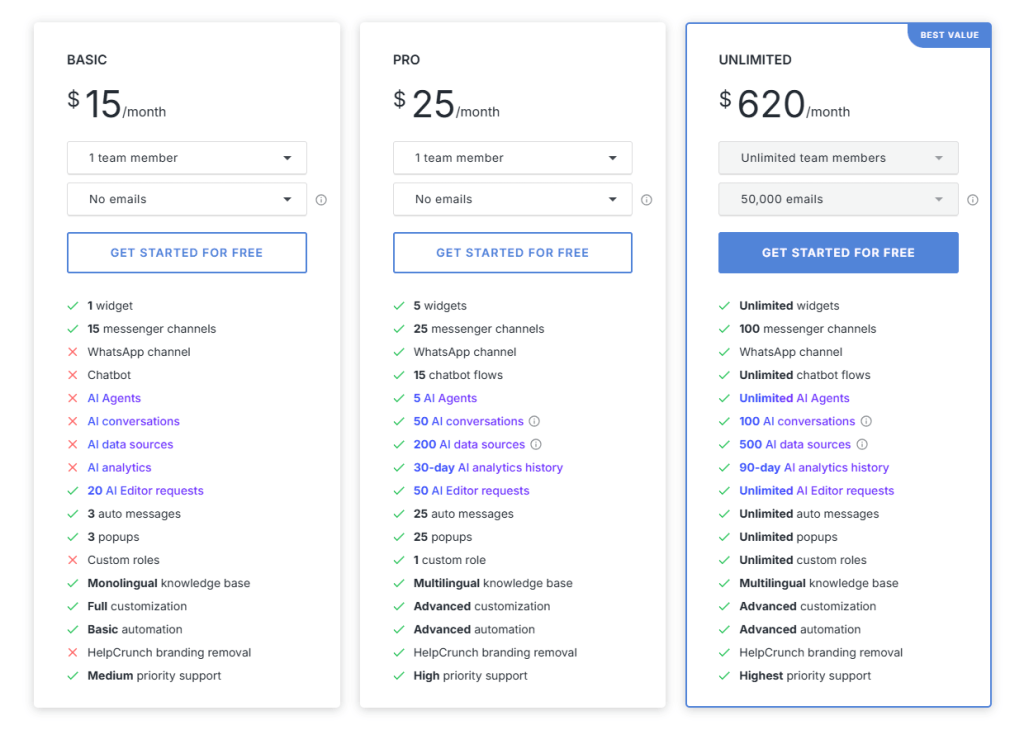
| Plan | Price | What You Get | |
|---|---|---|---|
| Basic | $15/month | Live chat, basic help desk, limited automation, 1000 contacts | See Details → |
| Pro | $25/month | Full communication suite, email marketing campaigns, automation, unlimited contacts | See Details → |
| Unlimited | $620/month | Everything in Pro + advanced workflows, priority support, custom integrations | See Details → |
Key insight: Pricing is based on features and contact volume, not number of users. Unlike Zendesk ($19/agent/month) or Freshdesk ($23/agent/month), HelpCrunch’s pricing doesn’t scale up with your team size—this is a major advantage for growing teams.
🧪 Real Use Evaluation
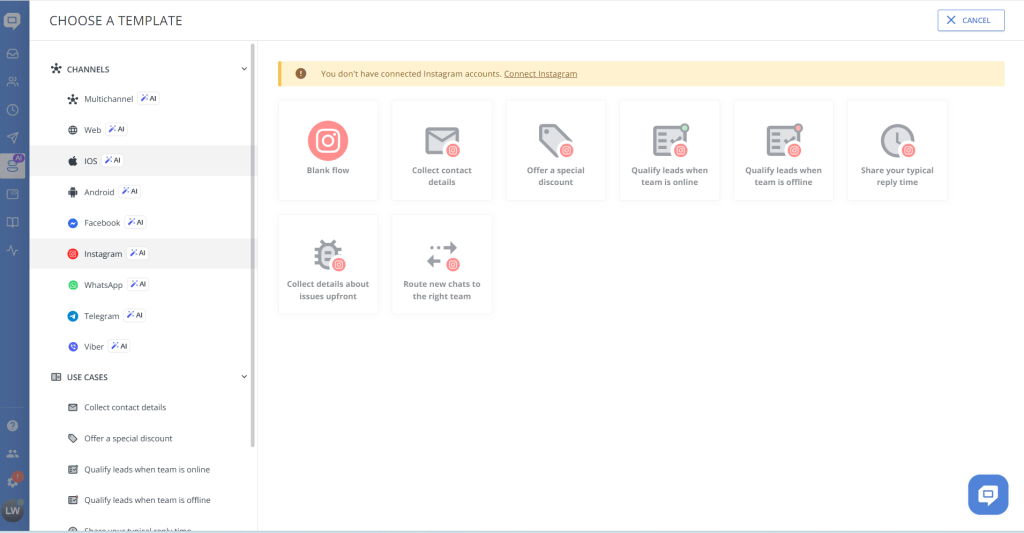
Setup Experience
We set up HelpCrunch on a Shopify store in under 25 minutes:
- Step 1: Sign up, add your website URL (2 minutes)
- Step 2: Copy the chat widget code into your site’s header (3 minutes, or use the WordPress/Shopify plugin for 1-click install)
- Step 3: Configure basic chat triggers and email templates (15 minutes)
- Step 4: Test in incognito mode, verify widget shows up (5 minutes)
Verdict: Extremely beginner-friendly. No coding required. If you can install a WordPress plugin, you can set up HelpCrunch.
Check current pricing and get started:
👉 Start 14-Day Free Trial →
Live Chat Performance
We tested the live chat widget on a sample site:
- Widget loads in under 1 second, no noticeable impact on page speed
- Customizable colors, position, and messaging to match brand
- Visitor tracking shows which pages visitors are viewing before they message—helpful context for support agents
- Proactive messaging can be triggered (e.g., “Hi! Need help choosing a product?”)
Email Marketing Performance
This is HelpCrunch’s strongest feature:
- Email campaigns builder is visual drag-and-drop
- Automation sequences: welcome emails, abandoned cart recovery, follow-ups
- Customer segmentation: tag users based on behavior, purchase history, chat interactions
- Open rates and click tracking built in
Compared to tools like Mailchimp or ActiveCampaign, HelpCrunch’s email features are simpler but integrated with your support data. This means you can email customers based on their support history—which most standalone email tools can’t do.
AI and Automation
HelpCrunch’s AI and automation includes:
- Auto-responses and chat triggers based on visitor behavior
- Email automation sequences
- Basic chatbot functionality (rule-based, not AI-powered)
Honest assessment: Compared to Tidio’s Lyro AI or Intercom’s Fin AI, HelpCrunch’s automation is more basic. It’s rule-based, meaning you define the exact triggers and responses. If you need advanced AI that can understand and answer complex questions automatically, Tidio or Intercom would be better choices.
But for most small businesses, basic automation is enough. You set up 10-15 common responses, and it handles 70%+ of repetitive questions.
⚙️ Key Features Breakdown
💬 Live Chat
- Customizable chat widget (colors, position, branding)
- Real-time visitor tracking (see which page they’re on)
- Instant messaging with typing indicators
- Chat history and customer profiles
📧 Email Marketing
- Drag-and-drop email campaign builder
- Automation sequences (welcome, abandoned cart, follow-ups)
- Customer segmentation by behavior and tags
- Open rates and click tracking dashboard
🎫 Help Desk
- Ticket tracking and assignment
- Customer history view (past tickets, chats, emails in one place)
- Team collaboration features
- Priority and status management
📚 Knowledge Base
- Create self-service help centers with custom domain
- FAQ management with search
- Guide and documentation organization
- Reduces support tickets by 30-40% in most cases
🔄 Automation
- Chat automation triggers (e.g., show message when visitor is on pricing page for 30 seconds)
- Email workflow automation
- Trigger-based messaging based on customer behavior
⚖️ Pros and Cons
👍 Pros
- All-in-one platform → No need for 3-4 separate tools (chat + email + help desk + knowledge base)
- Email marketing included → Most chat tools don’t include this, saves you Mailchimp pricing
- Easy to use → Setup in under 30 minutes, no coding required
- Good for SaaS businesses → Designed specifically for this audience
- Pricing doesn’t scale with team size → Unlike Zendesk/Freshdesk, you pay for features not per-agent
- Reduces tool fatigue → One login, one dashboard, one bill
👎 Cons
- AI features are limited → Rule-based automation, no advanced AI chatbot like Tidio/Intercom
- Not as powerful as enterprise tools → If you need advanced reporting and workflow automation, look at Zendesk or Intercom
- Interface can feel complex at first → Since it combines many features, it takes some time to learn everything
- Less specialized than single-purpose tools → Email is good but not as advanced as dedicated email tools
🧩 Who Should Use HelpCrunch?
Best for:
- SaaS companies that need customer support + email marketing + onboarding communication
- Startups that want an all-in-one solution without paying for 4 different tools
- Small to mid-sized businesses (1-20 team members)
- Teams needing email + chat + support integrated
Not ideal for:
- Large enterprise systems (50+ agents) → Look at Intercom or Zendesk
- Businesses needing advanced AI automation → Tidio or Intercom are better
- Companies that want highly specialized tools → Use Mailchimp for email, Intercom for chat, Zendesk for help desk
⚖️ HelpCrunch vs Alternatives
| Tool | Best For | Strength | Weakness | Starting Price |
|---|---|---|---|---|
| HelpCrunch | SaaS / startups | All-in-one communication + email | AI limited | $15/month |
| Tidio | Small business | AI automation (Lyro AI) | Email marketing weak | Free → $29/month |
| Crisp | Startups | Shared inbox, multi-channel | No email marketing | Free → $45/month |
| Freshdesk | Enterprise | Ticketing system | Complex, per-agent pricing | Free → $23/agent/month |
Quick comparison:
- Choose HelpCrunch if you want one tool for everything at budget pricing
- Choose Tidio if AI chatbot is your priority
- Choose Crisp if you need a simple multi-channel inbox
- Choose Freshdesk if you need enterprise-grade ticketing
If you’re ready to get started with HelpCrunch:
👉 Try HelpCrunch Free 14 Days →
❓ FAQs
Is HelpCrunch free?
No, HelpCrunch does not offer a fully free plan. The Basic plan starts at $12/month. However, they offer a 14-day free trial so you can test it before committing.
Is HelpCrunch good for SaaS?
Yes, it is designed specifically for SaaS companies and startups. The email marketing + live chat + help desk combination is perfect for onboarding new users and handling support inquiries.
Does HelpCrunch use AI?
It includes basic automation (rule-based chat triggers and email sequences), but does not offer advanced AI chatbot capabilities like Tidio’s Lyro or Intercom’s Fin. If AI depth is important, consider Tidio.
Can I use HelpCrunch for e-commerce?
Yes, HelpCrunch integrates with Shopify and WooCommerce. However, it’s more focused on communication than order management. For e-commerce-heavy needs, Tidio or Gorgias might be better.
How many team members can use HelpCrunch?
Unlimited. Unlike Zendesk and Freshdesk, HelpCrunch pricing is based on features and contacts, not the number of agents.
🎯 Final Verdict
HelpCrunch is a versatile customer communication platform that combines Chat, email marketing, and support tools into one affordable package.
It is ideal for businesses that want:
- One tool instead of multiple platforms
- Integrated communication and marketing
- Simple automation workflows
- Budget-friendly pricing that doesn’t scale with team size
It is NOT the best choice if you need:
- Advanced AI chatbot capabilities
- Enterprise-level ticketing and reporting
- Highly specialized single-purpose tools
For SaaS businesses and startups, HelpCrunch is a strong and practical solution in 2026. At $25/month for the Pro plan (full feature set, unlimited agents), it’s one of the best value all-in-one platforms on the market.
👉 Try HelpCrunch free for 14 days